Auteno · the app to set up and run your private lessons

Your private lessons.Your own business.

Your students, your lessons and your payments, in one app. Plus your own page where people can book you. No club or academy in between.

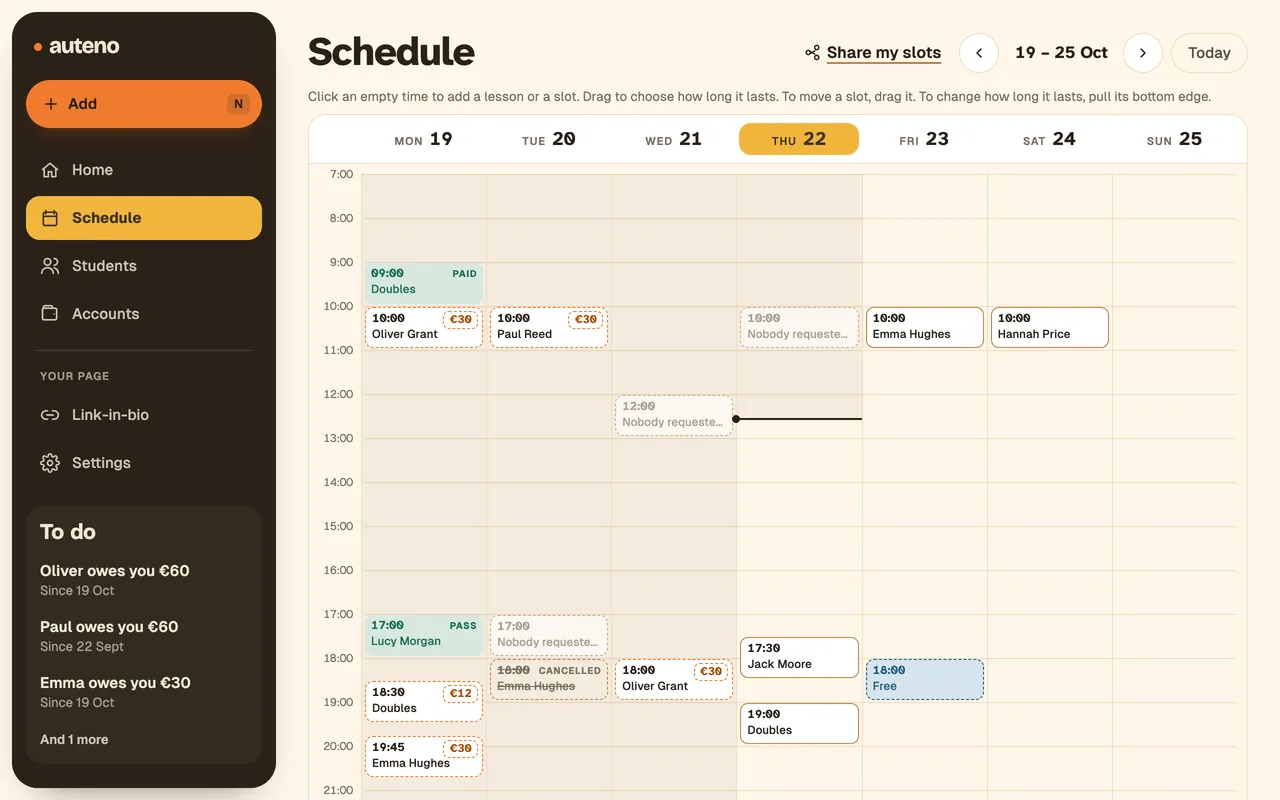
Auteno's schedule on a computer: the week's lessons, free slots and what's still to collect.
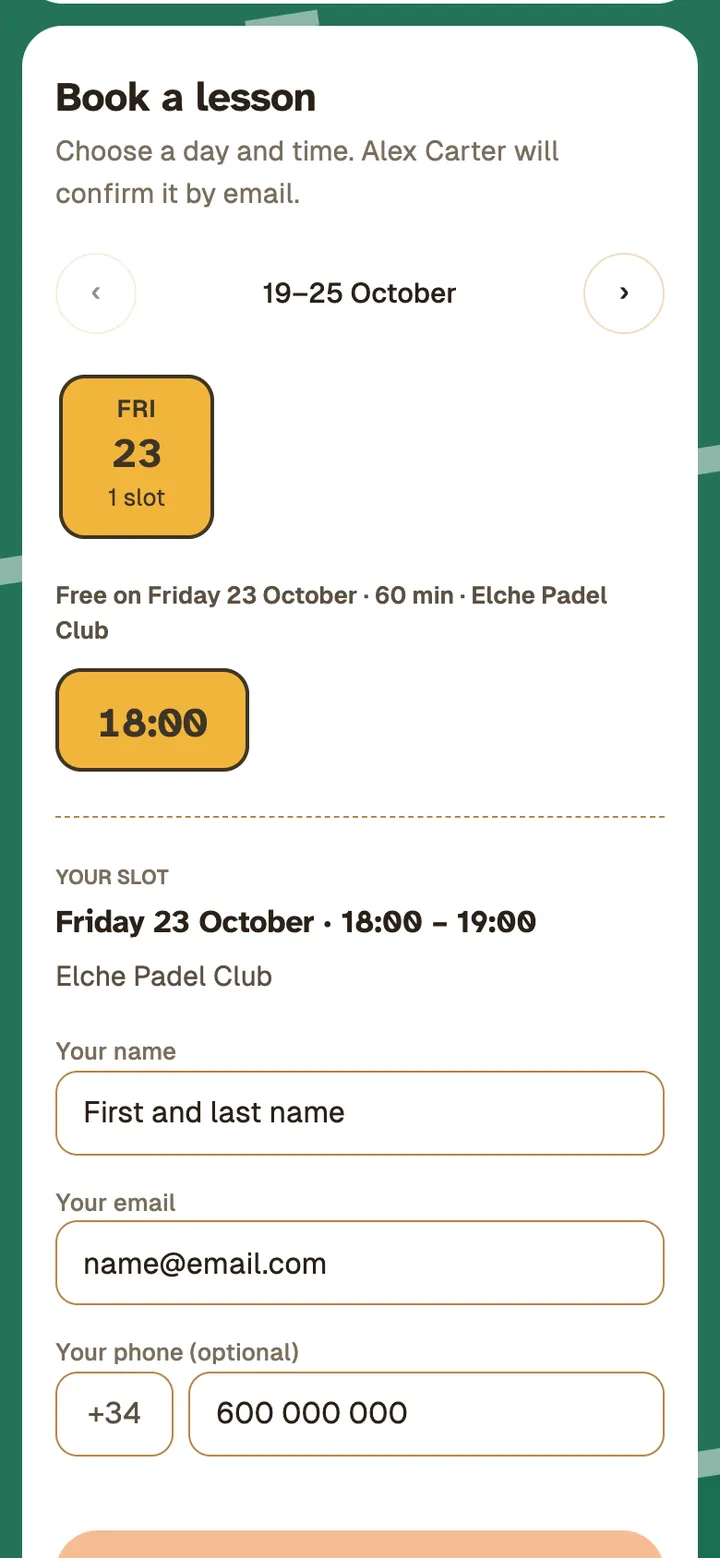
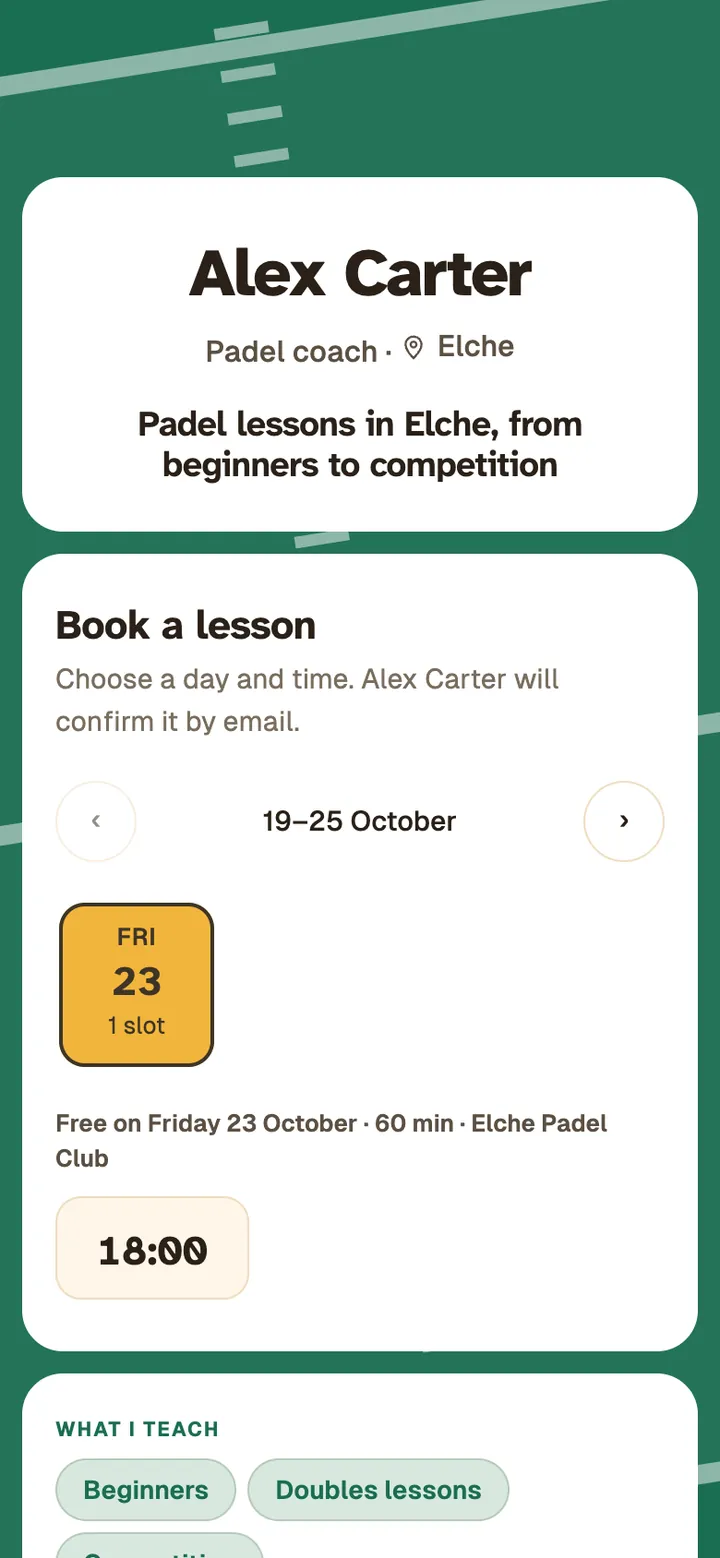
A coach's Link-in-bio made with Auteno: his name, what he teaches and his free slots to book.

See who has paid you, without hunting through chats.

Each lesson says whether it’s paid or pending. In between, your free slots and the ones people have asked for.

Still to collect today

€42

Example with test data. The labels are the app’s, translated: the app is in Spanish.

Monday 19

Today
  • 09:00

    Doubles

    2 students

    Paid: €36
    Andrés Peña , Paid Elena Fdez , Paid
  • 10:00

    Pablo Ruiz

    One-to-one

    Still to collect: €30
  • 17:00

    Lucía Moreno

    One-to-one

    Pass
  • 18:30

    Group

    3 students

    Still to collect: €12
    Pau Soler , Paid Elena Fdez , Paid Nerea Gil , Still to collect
  • 19:45 Slot requested · 60 min Marta Ruiz asked for it Requested
  • 21:00 Free slot · 60 min Can be booked from your Link-in-bio

Inside, your business. Outside, your shop window.

Add your lessons once and share your page. From there, everything in one place:

Schedule

Your whole week, on one screen.

Your lessons, your free slots and your students’ requests, together. A lesson that repeats every week goes in once.

  • Each lesson with its place: your studio, a club, the student’s home or online. The student sees it when booking.
  • Make groups of students, like “Advanced” or “Tuesday 19:30”. Then add the whole group’s lesson in one go.
  • Change something on your phone? You see it straight away on your computer.
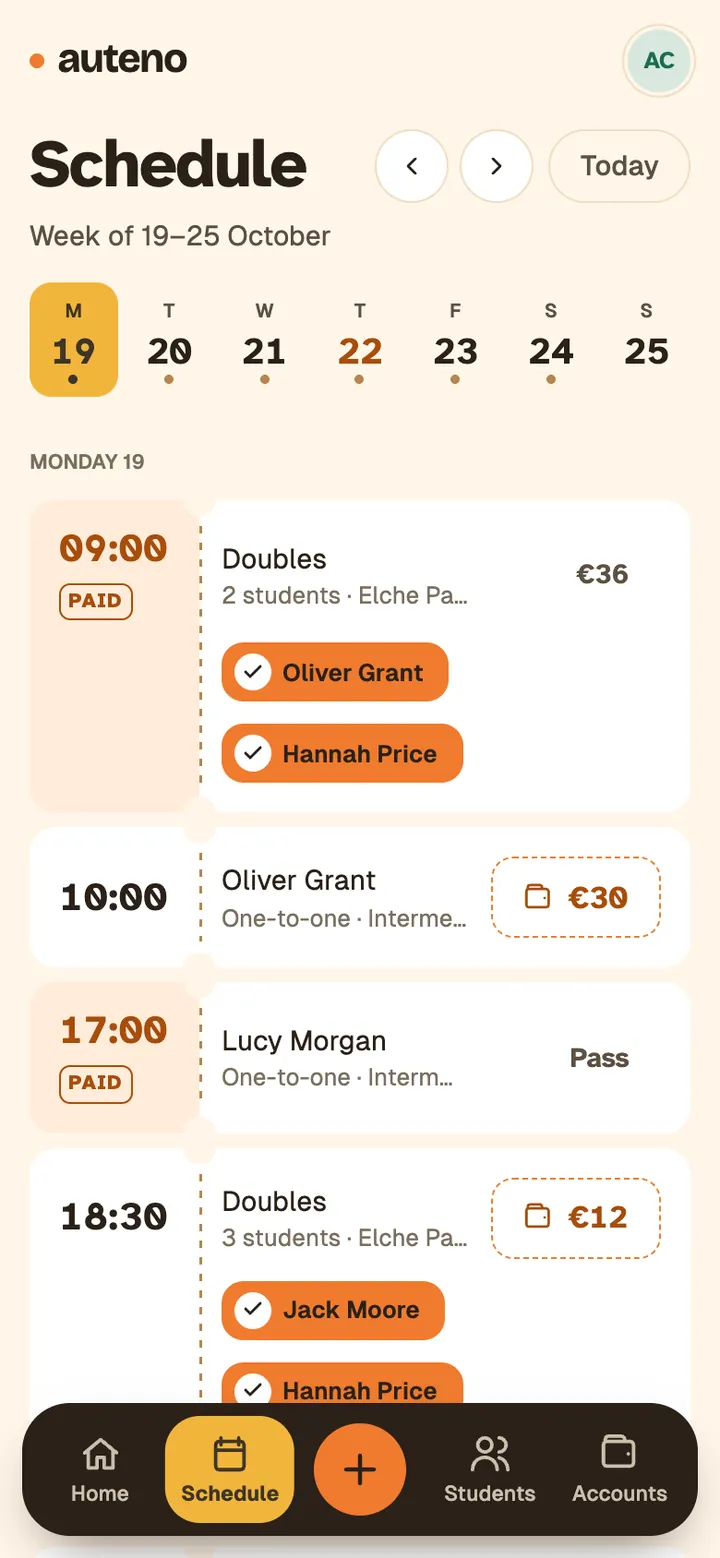
Auteno's schedule on a phone: today's lessons, paid, pending and on a pass.

Your calendar

Your lessons, in your phone’s calendar too.

You connect it once and forget about it. Every lesson you add shows up on its own in your usual calendar, next to the rest of your plans.

  • If you change or cancel a lesson, your calendar updates on its own.
  • Your free slots show up too, so you can keep an eye on them.
  • Works with Google Calendar, the iPhone calendar and Outlook.
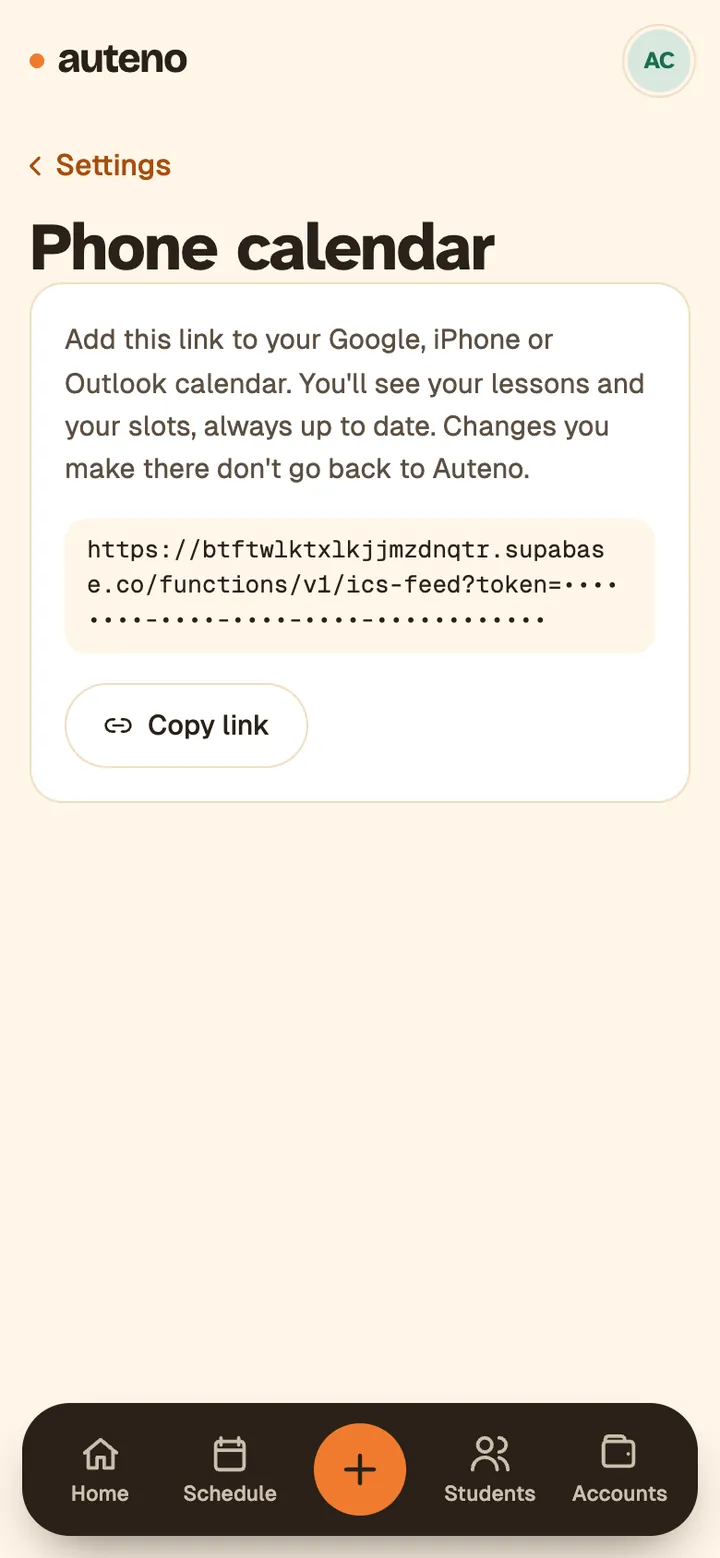
The phone calendar screen in Auteno's settings: the link you connect once to your calendar.

Payments

Get paid the way you already do.

In cash, by transfer or however you agree. The money goes to you. It doesn’t go through Auteno.

  • Per lesson, with a monthly fee or with a lesson pass (for example, 10 lessons paid in advance).
  • When they pay, you mark it with one tap.
  • With a pass, each lesson they take comes off on its own. Their page shows how many are left.
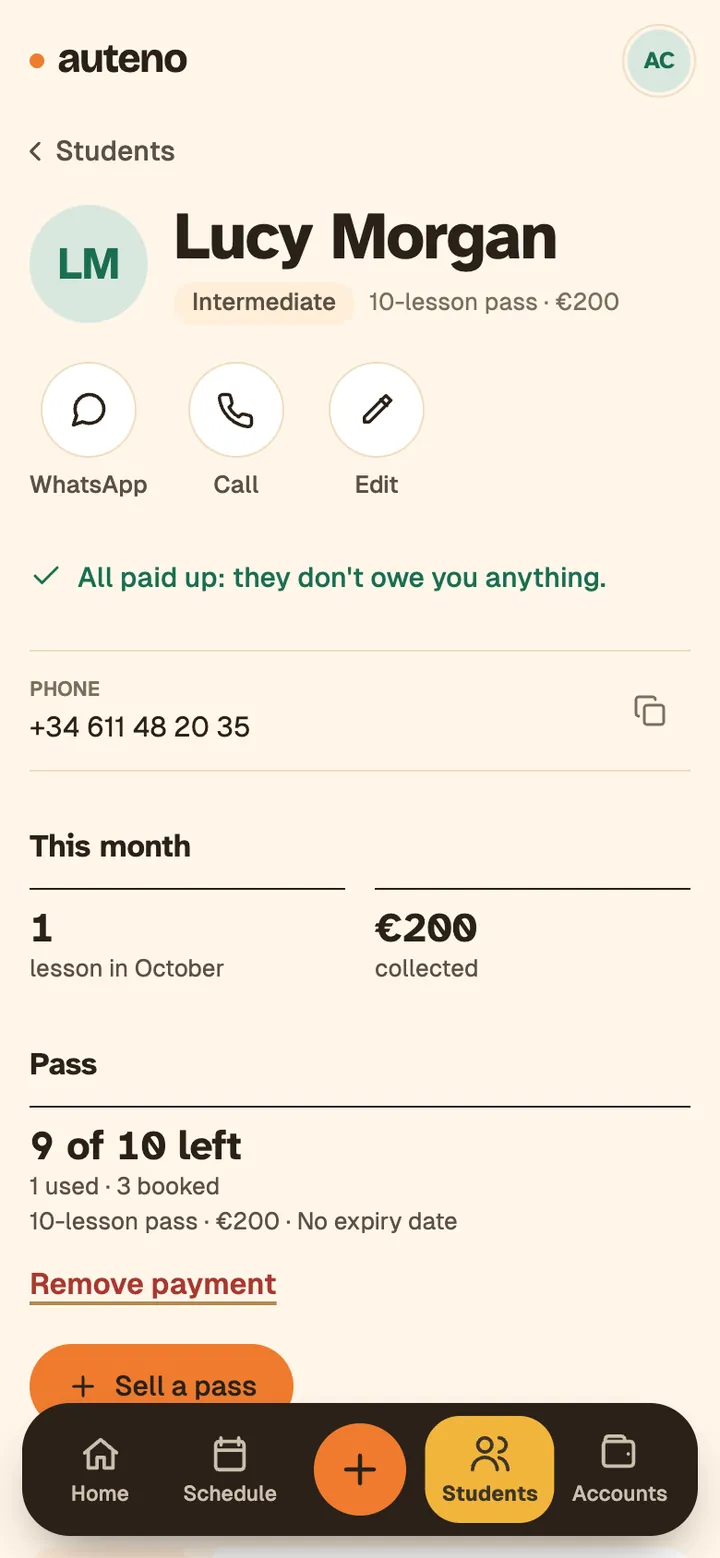
A student's page in Auteno with a 10-lesson pass: 9 left.

Owed to you

Who owes you money, at a glance.

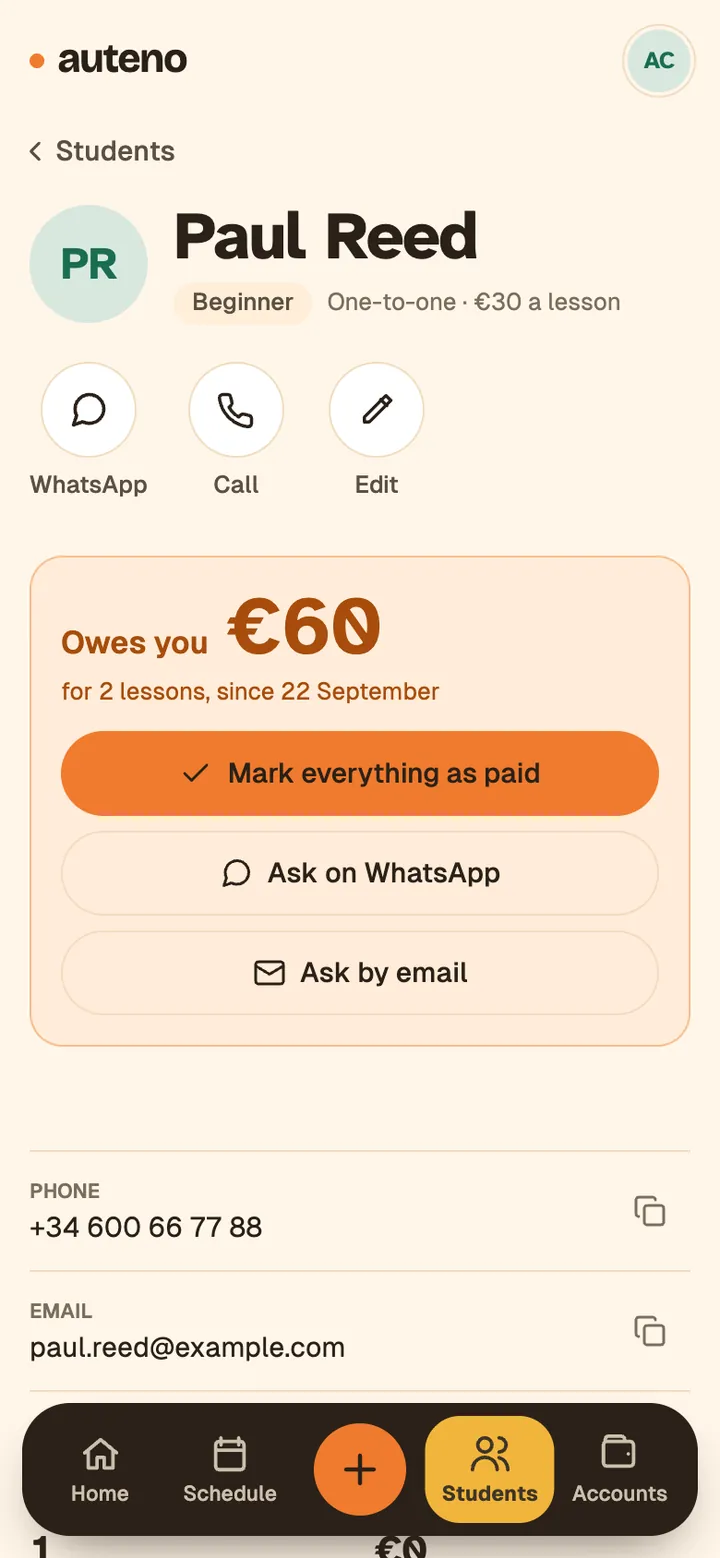
You see what each student owes you, already added up. No going back through chats or notebooks.

  • Want to remind them? The message is already written. Send it on WhatsApp or by email, whenever you like.
A student's page in Auteno who owes €60, with buttons to ask for it on WhatsApp or by email.

Accounts

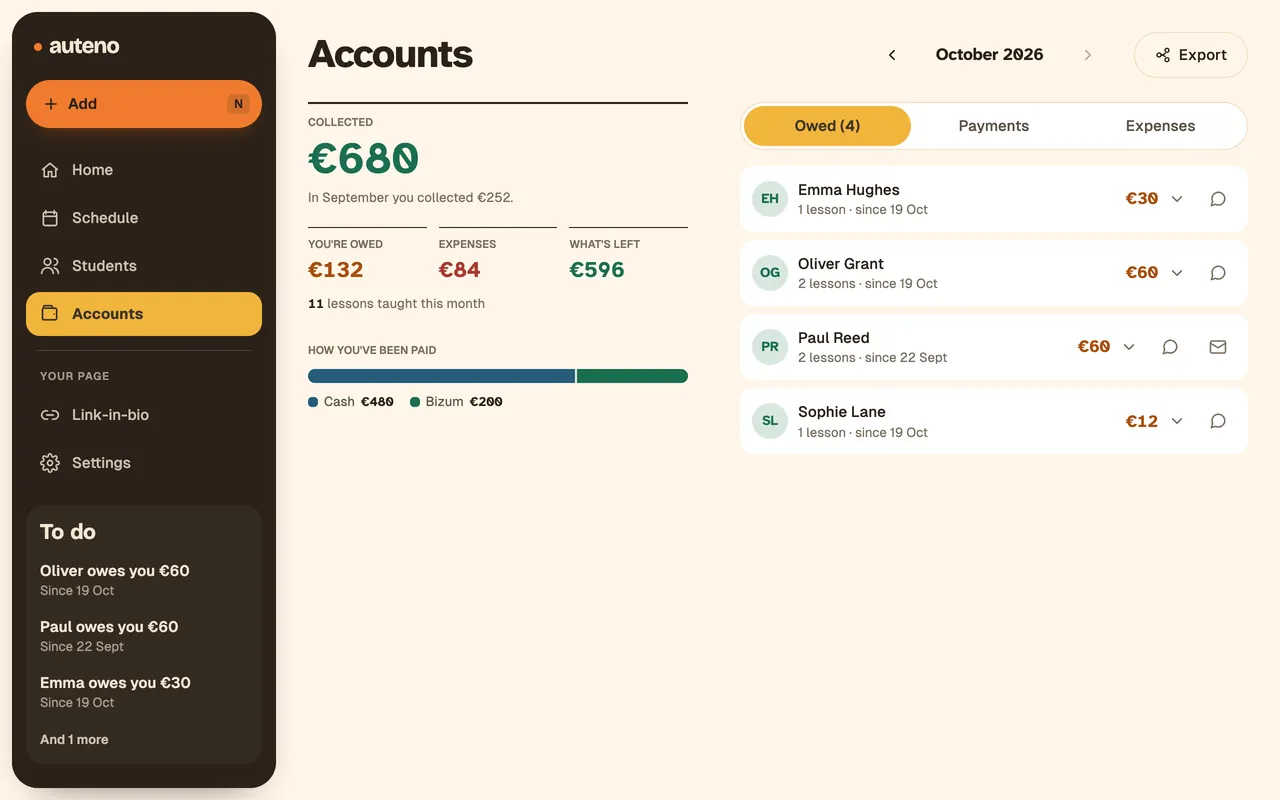
Your end-of-month balance, without doing the sums.

What you’ve been paid, what you’ve spent and what’s left, month by month.

  • Have an accountant? Export it to Excel and send it over.
Accounts in Auteno: what you've been paid this month, what you're owed, expenses and what's left.

Your students, always in the loop.

Auteno emails them at every step. You don’t have to write anything.

Subjects translated: the emails go out in Spanish.

  1. When they ask for a time

    They get an email confirming that you have received their request.

    Alex Carter via Auteno Subject: Request sent to Alex: Thursday 23, 18:00

  2. When you accept

    They get the confirmation with the day, the time and the place. And they can add it to their calendar.

    Alex Carter via Auteno Subject: Confirmed with Alex: Thursday 23, 18:00

  3. A day before

    They get a reminder of the lesson. If you don’t want it, switch it off in Settings.

    Alex Carter via Auteno Subject: Tomorrow you have a lesson with Alex: Thursday 23 at 18:00

  4. If you cancel

    We email them. If you like, add a few lines explaining why.

  5. If the student cancels

    If you allow it, they cancel from the same email, up to 24 or 48 hours before. We let you know right away.

The lessons are yours.

If you teach on your own, people should know it’s you who teaches. Auteno doesn’t put its name in front of yours or get between you and your students.

  • Your name up front

    Your page is auteno.app/your-name. People book you, not a club.

  • Your students stay with you

    Their details, your notes and what they’ve paid you go with you, wherever you teach.

  • Your money doesn’t go through us

    They pay you, in cash, by transfer or however you agree. Auteno just helps you keep track.

Good to know

  • No password

    You log in with a code sent to your email or with your Google account.

  • Your students install nothing

    No account either. They pick a time, leave their name and email. That’s it.

  • You choose what to show

    Your WhatsApp and how you get paid appear on your Link-in-bio only if you turn them on.

  • Leave whenever you like

    Export your accounts to Excel and delete your account from Settings.

What it costs

While in testing

0 €

  • Everything on this page: students, schedule, Link-in-bio, payments and accounts.
  • No card needed.
  • No commitment: delete your account whenever you like.
Create my account

Free while in testing

What you put in is yours: export your accounts to Excel whenever you like.

Questions

How much does it cost?

Right now, nothing: it’s free while in testing. There are no paid plans and we don’t ask for a card.

Is the app in English?

Yes. Choose English or Spanish in Settings. Your emails to students and your Link-in-bio come out in the same language.

Does it work for what I teach?

If you have students and teach on your own, yes: tutoring, languages, music, pilates, personal training, padel, tennis… Auteno isn’t about a subject, it’s about running your lessons.

I teach at a club or an academy. Is it for me?

For the lessons you run yourself, yes: your students, your hours and your payments. Auteno doesn’t run the club’s schedule or its courts.

Do I need to install anything?

No. It opens in the browser on your phone or computer, and if you like you can add it to your home screen like any other app.

What about my students?

Nothing for them either. They open your Link-in-bio and pick a time. They leave their name and email, no account needed.

Does Auteno write to my students on its own?

Only what’s needed, by email: when they ask for a lesson, when you accept or decline, and a reminder 24 hours before the lesson, which you can switch off in Settings. Asking for a payment or telling them you’re cancelling only goes out when you tap it, and if you turn it on, students can cancel from the email up to 24 or 48 hours before.

What about my data?

It’s yours. It’s stored in Europe, you can export your accounts to Excel whenever you like and delete your account from Settings.
For people who teach on their own.

Create my account

Free while in testing